Flagline Golf is not affiliated with, endorsed by or sponsored by Garmin. Garmin and Approach R10 are trademarks of Garmin Ltd. or its subsidiaries. This is our own guide; always check Garmin’s manual for your device.
For a good Garmin R10 indoor setup, put the R10 on the floor 6 to 8 feet behind the ball, line its red alignment line up with the ball and your target, and leave at least 8 feet between the ball and the net. That means a room at least about 14 feet deep, with enough width and ceiling height to swing a driver freely. Most “bad numbers” indoors come from placement and alignment, so get those right before blaming the unit.
Quick setup: R10 6–8 ft behind the ball · ball at least 8 ft from the net · red line pointing through the ball at your target · tripod legs fully open · wait for the green light · check alignment with a short wedge shot.
Garmin R10 indoor space requirements at a glance
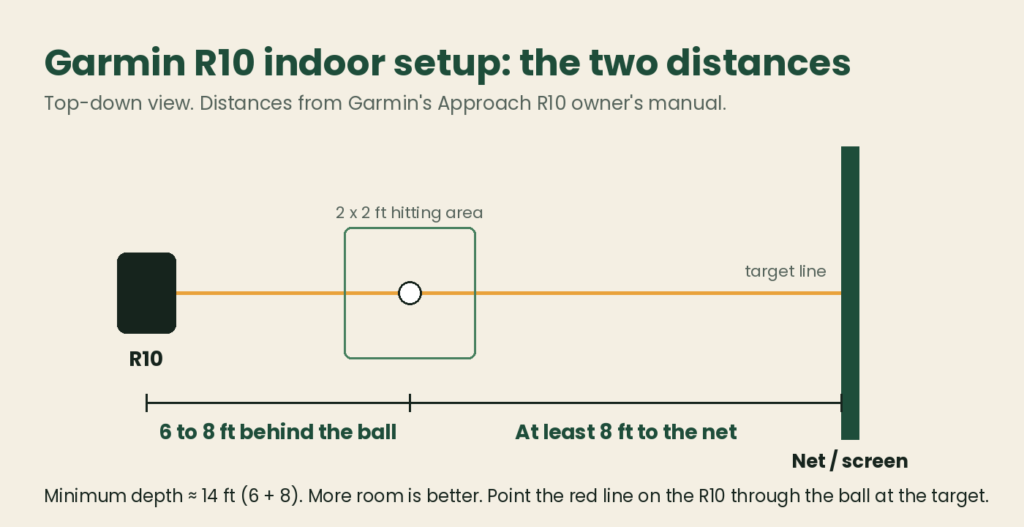
Garmin’s Approach R10 owner’s manual gives two key distances:
| Measurement | What Garmin’s manual says |
|---|---|
| R10 to the tee (ball) | Between 6 and 8 feet behind the tee |
| Tee to the net (indoors) | At least 8 feet |
| Hitting area | The ball can move up to 1 foot either side of the target line, in a 2 x 2 ft area that starts 6 feet from the R10 |
| Ceiling and sides | “Adequate” room so nothing blocks your backswing or follow-through |
Add those up and the shortest workable room is about 14 feet deep (6 feet behind the ball plus 8 in front). More depth is better: the retailer PlayBetter suggests a room about 10 feet wide, 21 feet deep and 9 feet high as a comfortable target, with around 13 feet from the ball to the screen if you have it. Width and height depend on how tall you are and your longest club, so test it (below).
Step-by-step Garmin R10 indoor setup
1. Check your swing room first
Before you buy a net or move furniture, take your driver and make slow full swings where the ball will be. You need clear space at the top of the backswing, at the finish, and on both sides. If you’re tall or the ceiling is low, you may need to leave the driver for outdoors and stick to irons inside. Garmin’s manual also says to pad any net or enclosure frame to cut down on ricochets, and to leave free space behind the net.
2. Place the ball and the net
Put your hitting mat so the ball sits at least 8 feet in front of the net. If you have room, more is better: the ball has more time to fly before it’s stopped, and you’re further from any bounce-backs.
3. Place the R10 6 to 8 feet behind the ball
Set the R10 on the floor, on its tripod with the legs fully open, 6 to 8 feet behind the ball. If you use a mat, Garmin says the bottom edge of the R10 should sit above the mat, not tipped against it. Keep it on a level, stable surface; it will warn you if it’s tipped too far.
4. Line up the red alignment line
The R10 has a red line on top. Point it so it runs through the ball and on to your target. This matters more than people think: Garmin’s manual says that if alignment is off by several degrees, the direction numbers will be off by several degrees too.
5. Enter the distance and wait for the green light
When the app asks, enter the actual distance from the R10 to the tee. Then wait for the status light to flash green before you hit. Hitting before it’s ready is a common cause of “missed” shots.
6. Check alignment with a short wedge
Hit a short, straight shot with a sand wedge and compare its launch direction in the app with what you saw. Garmin explains that if the R10 faces left of your target line, the app will show the shot starting further right than it really did. Nudge the unit and repeat until straight shots read straight.
Fixes for bad readings indoors
If shots are missed or the numbers look wrong, work through this list before anything else:
- Recheck the two distances. 6 to 8 feet behind the ball, at least 8 feet to the net. Moving the R10 closer than 6 feet to save space is one of the most common problems.
- Recheck the alignment line with the wedge test above. A unit bumped a few degrees will skew every direction number.
- Keep the ball inside the hitting area. Teeing it more than a foot off the target line puts it outside the area the R10 is set up for.
- Wait for the green light before every shot.
- Make the radar’s job easy. The R10 is a radar unit, so things that move or reflect between the R10 and the net (a ceiling fan, a swinging door, shiny objects) are worth removing. This is general advice from radar launch monitor users, not a Garmin rule, but it costs nothing to try.
- Keep the same setup every session. Mark where the R10, mat and ball go with tape on the floor, so your numbers are comparable week to week.
A 10-swing check: are your readings steady?
Once it’s set up, run a quick check:
- Hit 10 shots with the same mid-iron, your normal swing.
- Count how many the R10 read (some apps show missed shots).
- Write down the carry of each one and look at the spread.
If several shots weren’t read, go back through the fixes list. If they were all read but the carries jump around a lot, that’s usually your strike, not the R10. Either way, you now have a baseline to compare with after any change.
Log your sessions so the numbers mean something
A launch monitor gives you a lot of numbers, and they disappear when you close the app. Write down a few for every session: date, club, number of balls, average carry, shortest and longest carry, and how far offline. Over a winter, that shows real progress, or shows you what to change.
Our Sim Session Logbook is built for exactly that: session pages, gapping pages and round stats for simulator play. Not sure what all the numbers mean yet? Start with carry and how far offline, and see our guide to how far you should hit your 7-iron for what to compare them with.
Garmin R10 indoor setup FAQ
How far behind the ball should the Garmin R10 be?
Garmin’s manual says between 6 and 8 feet behind the tee. Many owners use 7 or 8 feet when the room allows. Enter the real distance in the app when it asks, so it can calculate accurately.
How far does the ball need to be from the net with an R10?
At least 8 feet when playing indoors, according to Garmin’s manual. More space is better if your room allows it.
What’s the smallest room for a Garmin R10?
About 14 feet deep is the minimum (6 feet behind the ball plus 8 feet in front). Width and ceiling height depend on your height and swing, so make slow full swings with your longest club where the ball will sit before you set anything up.
Can I use the R10 with just a net, no screen?
Yes. The R10 measures the shot and the app shows the numbers on your phone or tablet, so a net and a mat are enough for practice. A screen and projector are only needed if you want to see the ball fly on a big picture.
Get more out of your setup
Join the Flagline list below for the free Practice Printables Pack: a practice plan, club distance chart, range cards, stats card and more.
Sources
- Garmin, Approach R10 Owner’s Manual: garmin.com
- PlayBetter, Garmin Approach R10 golf simulator space requirements: playbetter.com